Because it’s Mother’s Day, this Sunday I’m taking a moment to remember my mom.
I like to think my love of creative pursuits came from her. She told me she would have liked to go to college and to become an author, but women in her time rarely went to college or pursued careers. She did, though, play in an all-female Croatian Orchestra, The Happy Girls Tamburitza Orchestra, during the WWII years.
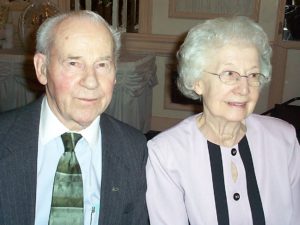
My Mom and Dad in 2006 on their 50th Wedding Anniversary
This is my tenth Mother’s Day without my mom. There are so many things I wish I could talk with her about. Her life was ended in 2007, as was my dad’s, by someone else’s choice to drive while intoxicated.
As we move toward the coming Spring and Summer holidays, please celebrate safely.
You may have heard recent news reports about ebook sales dropping and print sales increasing. As a reader, this likely makes little difference to how you prefer to read (or listen) to books. I read about half ebooks and half paper books depending on whether I’m traveling, how quickly I want to get a book I’m interested in, and whether one of my friends who buys favorite authors’ book in hardback passes them on to me.
As authors, though, how much time and effort we put into marketing print books versus paper books might be affected by reports about ebook sales. For that reason, this Friday I recommend reading Nate Hoffelder’s Digital Reader post. In it, Nate explains why these reports about ebook sales dropping keep appearing, and why the figures, though accurate, are misleading because they leave out a large number of ebook sales.
Those missing sales include, as just one example, any ebook sold by an independent author who publishes without an ISBN. Amazon, among other ebook publishing platforms, does not require an ISBN for ebooks. There are over 5 million ebooks on Amazon, so if even a fraction are published without ISBNs, that significantly skews the figures.
I love podcasts. There’s a list of my favorite ones at the end of this article. If you read my Friday recommendations, you know I learn a lot from them. I also find them entertaining. The same is true for audiobooks.
Not only can podcasts and audiobooks be fun or entertaining or both, listening allows me to make good use of time spent doing mindless tasks like scanning records to store for my law practice, putting away clean dishes, or sorting through and disposing of emails in my spam inbox.
Being able to multitask that way is particularly helpful for anyone juggling writing and other types of work and obligations. Otherwise, many of us would never have time to hear or watch, for instance, a 30-minute explanation of how best to use Facebook ads to sell books.
Recently, though, when a couple of my favorite shows ended, I briefly found myself listening less. To my surprise, I discovered that sometimes silence is better. Better for my creativity, better for my health, and better for my peace of mind.
Here’s why and how:
Creativity
While doing mindless tasks like folding laundry in silence, I often come up with good ideas for plots, discover the backstory of my characters, or solve problems I’m facing in fiction or life. But I don’t do those things by trying. Instead, as I smooth out the wrinkles in a T-shirt or fold sheets, my mind wanders. Soon, without any real effort on my part, ideas and solutions filter into my consciousness.
Sleeping
Because most of my work for writing, teaching, and law involves using my laptop, I get a lot of neck and upper back strain. I also tend to sit or stand in the same position for long periods. To ease that, I do a series of stretches at night before I go to sleep. I discovered that doing those in silence, while it can be a bit tedious, helps me sleep much better.
Instead of feeding new information into my brain right before trying to sleep, I let my brain slow down along with my body. That means I’m much less likely to wake during the night or to wake in the morning feeling stressed.
Time
Multitasking should make a person more efficient, particularly when it involves learning and listening while doing tasks that truly don’t require a lot of attention. Paradoxically, though, when I was listening to audiobooks or podcasts all the time, I felt more stressed and busier. I think it’s because that added to my feeling that I must be productive times two every minute of every day.
It was as if I was sending myself a message that I could not spare even five minutes to unload the dishwasher or make a cup of tea without also learning something new.
When I allowed myself instead to do some of these tasks in silence, I actually felt like I had more time. And when I did sit down to do tasks that required mental effort, I felt less stressed and so was able to focus more, think more clearly, and accomplish my goal more quickly.
Relaxation
This reason is really a combination of all of the above. When I let myself do just one thing, whether it’s stretching before I go to sleep or unloading the dishwasher, I can actually feel my muscles loosening and tension draining from my body.
Given all of the above, will I stop listening to podcasts or audiobooks when I’m folding laundry? No, not entirely. I love learning and I love listening to stories. Sometimes the prospect of one or the other is the only thing that motivates me to do tasks I’d otherwise put off, like cleaning out the email inbox.
Also, I live alone and work mainly from home now that the bulk of my workday is writing. On a day when I haven’t gone out, which occasionally happens, it’s nice to add some other voices besides my own and that of my parakeet (who does talk) to my day.
I have, however, stuck with leaving the phone off for 30-45 minutes before I go to bed. I also do at least one task during the day, whether it’s cooking or scanning documents, without any audio accompaniment.
Already because of this I’m making better progress on the first draft of The Worried Man, the first novel in my new mystery series. I’m feeling more relaxed while accomplishing as much or more than before.
What’s your experience with multitasking? Please share in the comments.
Until Friday –
Best,
L.M. Lilly
P.S. Here’s the list of my favorite podcasts:
The Journeyman Writer (no longer being produced, but many great episodes are available)
Print-on-demand (or POD) publishing has made it far easier for authors to publish their own work. As I wrote about last Sunday in The Downsides Of Print On Demand Publishing, however, there are some drawbacks.
Also, some authors plan to publish not only multiple titles of their own, but to collaborate with others. That can make it more worthwhile to take a different approach to publishing.
For any of these reasons, or simply for the sake of comparison, you may want to learn more about adapting the methods of traditional print publishing for yourself. A great place to start is the following post from Joanna Penn:
Most authors I’m familiar with who publish their own work do so via print-on-demand platforms such as CreateSpace or Kindle Direct Publishing, which I wrote about in Using KDP To Self Publish A Paperback.
If you choose to publish a paperback that way, the biggest plus is that you don’t need to pay for a large quantity of books and hope to sell them later, or to pay for any books in advance at all. Each book is printed when it’s ordered. The author is paid a royalty based on the purchase price.
Book 1 in The Awakening Series
But there are some downsides for the author, ones I wasn’t aware of when I started out with my Awakening series.
First, the cost to produce each book is generally higher, which means the author either earns a fairly low royalty or prices the book higher than most traditionally-published books.
Because I prefer to keep my prices in a range that’s similar to traditionally-published books, on trade paperback sales outside of Amazon, I typically make less than $.25 per book. (Sold through Amazon or in person, I earn a few dollars per book.)
Second, bookstores usually won’t carry print-on-demand (POD) books. The main reason is that the books typically aren’t returnable. If the bookstore orders five of them and only one sells, the store can’t send the other four back.
Another reason I heard from one bookstore owner is that Amazon is the competition and the stores don’t want to promote Amazon products. Because many authors use Amazon platforms CreateSpace and KDP for POD books, that rules them out. (If you want to try a different company, check out Ingram Spark.)
For similar reasons, some bookstores won’t carry a book that refers to Amazon anywhere on its cover, back blurb, or inside. I had no idea about that when I published Book 1 in my Awakening Series, though I probably ought to have figured as much. By the time I published the paperback, the Kindle edition had spent many weeks in the Top 50 of Amazon’s occult bestseller list (the highest rank was No. 1) and its horror list. I was excited about that, so I thought listing Amazon Best Seller on the cover was a great idea.
When I reissue the book with the updated cover (shown above), I’ll leave that off. It’s a bit of a tough call, though. When I sell at in-person events, that Best Seller reference tips some buyers over the edge to purchasing.
Finally, there are distribution outlets, such as libraries, that are unlikely to purchase books from CreateSpace.
Because for now I believe my time and effort are better spent focusing on ebook and audiobook sales rather than print despite the above downsides, I plan to continue using CreateSpace and KDP. If I explore other options later, though, I’ll be sure to let you know.
In 2016, Gregory Norris sold 54 short stories and 4 novellas. A full-time writer, Norris is interviewed on this week’s Self-Publishing Podcast.
Whether you plan to write short fiction or not, this Friday’s recommendation, Making Money with Short Stories with Gregory Norris, is well worth a listen. (If you want to skip the opening chitchat, start around 8:30, when Norris joins the podcast.)
Norris talks about paying markets for short fiction, writing a strong cover letter, how much you can earn at short stories, and how the form differs from novel writing.
Lately I’ve been writing about what tasks authors might need or prefer to do themselves. While proofreading is a good task to outsource because it’s so hard to see errors in your own work, it remains a skill every writer needs, which is why I’m sharing proofreading tips below.
Even if you send your novel to a proofreader, it’s important to proofread your novel yourself at least once. Doing so will help you to ensure all errors are caught and to spot quirks in your writing, such as overuse of certain words. (For a while, I added the word “up” all over the place—stand up, start up, fix up—and never noticed how distracting it was.)
So here are my seven tips:
Take Time Off
After you call your novel finished—truly finished as in ready to hit publish or submit to an agent or publisher—set it aside for a week. If that’s not possible, take at least a day to do anything but write. Take a vacation day, focus on your other job or profession, binge watch a series on Netflix.
Whatever it takes, clear your mind. After that, it’ll be easier to spot errors.
Read Three Words At A Time
Grouping words in three is one of the best ways to spot grammar errors, misused homonyms, and spelling. (Homonyms, which are words that sound the same but are spelled differently, such as “where” and “wear,” are the main reason you can’t rely on your word processor’s spell checker alone for proofreading.)
As you read, pause after each third word and at the end of each line. With this technique, the first sentence of this article would read like this:
Lately I’ve been writing about what tasks authors might
need or prefer to do themselves.
Alter How The Manuscript Looks
If you normally rewrite on screen, change the format. Making the words look different makes it less likely you’ll read through errors.
A few ways to achieve that:
Print your manuscript and review it on paper
If you’re in Microsoft Word, use the Print Preview or View function to make it look more like a page in a book
Enlarge or shrink the page
Change the font or font size
If you’re proofreading a Vellum file, switch from iBook to the Kindle view and back every few pages
Read Aloud
It takes a long time to read a novel out loud, so while it’s ideal, it’s unrealistic. But you can shift from reading to yourself to reading aloud every few pages. It’ll help you get a fresh look and spot mistakes.
If you’ve made changes or updates, read out loud the paragraph where you made the edit and the ones before and after it. That will ensure you spot any errors you accidentally introduced.
Use A Ruler
If you proofread on paper, place a ruler under each line as you read. This will help you focus on each line on its own and will make it less likely you’ll get lost in the story. You can also run your fingers under the line as you read, but that’s not quite as effective.
If you’re proofing on screen, you can get a similar effect by proofing each line at the bottom of the page as you scroll up.
Read Backwards
Rather than starting on page one of your novel, start with the last page. Read it top to bottom, then read the second-to-last page, then the third-to-last page.
This requires a bit of double reading when you reach the end of a page, as you’ll need to glance at the following one to be sure the transition makes sense. But overall it doesn’t take much longer than reading through from beginning to end, and it will keep you from getting lost in the story and missing errors.
Aim For Perfection
Make it your goal to publish or submit a novel that’s free from all errors. Is that realistic? Maybe not, especially if your manuscript is 70,000 or 80,000 words or more.
But if you aim for perfection, the odds are, at worst, you will catch most typos. If you mentally shrug your shoulders and decide that typing “where” instead of “wear” or “therefore” instead of “therefor” really doesn’t matter, it’s likely you’ll produce work with many errors.
I hope that’s helpful. If there are typos in the above, I’ll be really embarrassed.
Until Friday—
Best,
L.M. Lilly
P.S. If you’d like a second set of eyes, the proofreader I use for my novels is great at spotting typos, missing words, and unintentional grammar errors (yes, there are intentional ones in my fiction, which she understands!). You can find more information at SMR Proofreading & Editing.
I’ve had articles, short stories, and poems published traditionally, but a lot of my posts focus on self-publishing, as that’s how I’ve published my novels.
Because of that, I haven’t kept up as well as I’d like with current trends and practices of traditional publishers. To try to remedy that, I checked out this episode of the Self-Publishing Formula.
I hope you’ll find it as interesting and helpful as I did.
There are a couple ways to self-publish your novel in paperback. I just tried a new option from Amazon’s KDP (Kindle Direct Publishing) platform. Until recently, you could only publish a Kindle edition through KDP.
For my Awakening supernatural thriller series, I used a different Amazon company, CreateSpace, for the print editions. Because I was short on time, rather than try the do-it-yourself options, I paid CreateSpace to format the manuscript and create a paperback cover. The explanations on CreateSpace for how to do those tasks myself struck me as too daunting and technical.
KDP seemed like a simpler and clearer process, so I decided to try it.
Here’s my view on using KDP to publish a paperback, feature-by-feature:
Cover
Verdict: Thumbs Up
Print Cover
It was easy to create the cover once I got the hang of using the features. I uploaded the JPEG file I already had for the e-book. KDP automatically created several paperback options with a spine and back cover based on the front cover design and colors.
I choose the option that made the front cover an exact match for the e-book cover and extended the background across the spine and the back cover.
Kindle Cover
By clicking on the text boxes KDP provided, I pasted in my author biography and book description from a Word file onto the back cover. My title and author name were automatically included on the spine, minus the subtitle because the text is too long.
Overall, an easy process.
Manuscript Layout
Verdict: A Qualified Thumbs Up
I’d been hoping that KDP would magically convert my e-book file (a MOBI file I created in Vellum) into a paperback, but no such luck. Instead, I needed to upload a Word file.
Uploading was easy. Formatting the Word file before uploading was more challenging.
KDP provides templates for whatever paperback size you want to use, but the template I downloaded included only the correct margin and sizing. I chose a font in Word that I thought would look good (Book Antiqua 12 pt.).
I struggled with page numbering. After consulting a lot of Help screens and experimenting, I learned how to break the manuscript into sections, which in theory allows different pagination for each, but I never could get it exactly how I wanted it. I settled for small Roman numerals that start with page 2 on the copyright page (I’d wanted them to start on page 2 of the Preface) and ordinary numbers from Chapter 1 on.
After the page number challenge, I opted not to try to create headers with the title on the left-hand pages and my name on the right, though I would have liked to do that.
Now that I’ve done formatting once, I suspect I’ll have an easier time in the future. But when I was doing it, I concluded I’d rather pay someone else to deal with it.
Book Description For Amazon
Verdict: Thumbs Up
The book description from the Kindle version appeared in that section for the paperback automatically, so that was easy.
Price/Royalty
Verdict: Not Enough Data
Because this book is very short, I wanted to keep the price low so readers would not be disappointed or expect a full-length book. The lowest price I could choose that ended in .99 was $3.99. That resulted in a royalty under $.30.
I suspect I couldn’t go lower because there’s a basic set up cost Amazon wants to recover before its worth allowing an author to publish. Because this was an experiment, I was okay with this price structure.
Based on my experience with CreateSpace, the numbers should work out better for a longer book. I plan to try it for my standalone supernatural suspense novel, When Darkness Falls, which is over 80,000 words. I’ll update this post once I do that.
Print Quality
Verdict: Thumbs Up (plus a gold star)
With CreateSpace, I always request a print copy to proof before approving the final version. I do that because I like seeing how the cover and page layout look on paper. I also find it helpful to proof the book on paper one last time.
KDP Publishing does not offer print proofs. I assume that’s part of what keeps the upfront cost to the author at zero. The only way to do a last check of the book is via the online preview function. That was pretty easy to use, and I was able to eyeball the entire book to make sure it looked OK.
It made me a little nervous to hit publish without actually holding the paperback in my hands. But I was happily surprised that the paperback looks great.
Author Copies
Verdict: Thumbs Down
Every year I share a table under the Chicago Writers Association tent at the Printers Row Lit Fest in Chicago. I also have live book events for new releases in my Awakening series.
Through CreateSpace, I’m able to buy print copies of my books at cost and sell them for whatever price I choose at live events. (The shipping charges add to my cost, so I don’t earn a lot, but it is generally $1-$3 a book.) CreateSpace also usually sends a small number of free copies to the author.
KDP publishing does not offer author copies or the ability to buy at cost for authors. The only way to get copies of the book is to order them off Amazon. The author does still get the royalty for that, so you’re getting the book at the cost. But it means paying more money initially.
For that reason, I doubt I’ll use KDP for books that I envision selling at events.
On the other hand, this feature matters not at all for the other reasons authors make paperbacks available. Those include (1) offering a paperback for readers who don’t have ereaders; (2) highlighting the lower Kindle price through comparison to the paperback price; and (3) validation (many readers feel better trying out a new author whose books are also offered in print).
To that last point, though, oddly, Amazon so far has not automatically linked the paperback and Kindle versions, which I would have thought it would do given that I published them from the same platform. If that doesn’t happen soon, I’ll email KDP Help and ask them to do it.
Distribution
Verdict: Neutral
Unlike CreateSpace, KDP does not offer distribution to non-Amazon sites. So my small book on the Supreme Court will not be available through Barnes and Noble’s website, though the books in The Awakening series are.
I’ve heard the country distribution is more limited on KDP than CreateSpace, though the KDP help screen says KDP distributes to Japan and CreateSpace does not, so that may work both ways.
The proportion of paperbacks I sell compared to ebook and audiobook editions is small, and I mainly publish them for the three reasons listed above, not as a money generator. For those reasons, the distribution doesn’t matter that much to me.
If you are focused on selling paperbacks, you may want to look further into the distribution question.
Conclusion
In summary, I had a good experience with KDP for creating a paperback. I give it a Thumbs Down solely for the lack of author copies, a neutral/not enough data rating on pricing and distribution, and a Thumbs Up for cover, manuscript formatting, book description, and print quality.
I hope that’s helpful. If you’ve tried KDP or another platform for your paperbacks, please share you experience in the Comments.
In the 1990s, a friend told me he’d read an article that said in the future no one would buy books. Instead, people would have this amazing device that could turn into any book just by asking for it. That sounded impossible to me, and I didn’t connect it with the computer on my desk with its giant monitor, bulky processing unit, and dial up Internet connection that made odd pinging noises.
Yet here we are in 2017, and I both read books on Kindle and publish my novels in numerous ebook editions. (I still read paper books, too, as do many people, so that part hasn’t completely come true.)
Publishing seems to change by the minute, and advances like cars with built-in capacity for streaming audiobooks and virtual and augmented reality technology will no doubt will cause further evolution. So this Friday, my recommendation is the podcast/video episode from The Creative Penn on the future of publishing.

 As authors, though, how much time and effort we put into marketing print books versus paper books might be affected by reports about ebook sales. For that reason, this Friday I recommend reading
 Even if you send your novel to a proofreader, it’s important to proofread your novel yourself at least once. Doing so will help you to ensure all errors are caught and to spot quirks in your writing, such as overuse of certain words. (For a while, I added the word “up” all over the place—stand up, start up, fix up—and never noticed how distracting it was.)

 KDP provides templates for whatever paperback size you want to use, but the template I downloaded included only the correct margin and sizing. I chose a font in Word that I thought would look good (Book Antiqua 12 pt.).
 After the page number challenge, I opted not to try to create headers with the title on the left-hand pages and my name on the right, though I would have liked to do that.